 Witness Record
Best iPhone apps for filmmakers and journalists
Grouped by the job, not by rating, with the one conflict I have declared up front.
Disclosure. I make one of the apps on this page. It is in the verification section, it is clearly labelled, and I have tried to write about the alternatives the way I would want someone to write about mine. Take the rest of the list on its merits and discount that section as you see fit.
Filmmakers and journalists want overlapping but genuinely different things from a phone. A filmmaker wants control of the image. A journalist wants the material to be defensible, retrievable and not a liability to the people in it. Most "best apps" lists cover the first and ignore the second entirely, which is how you end up with a beautifully graded Log clip that nobody can verify and a source who can be identified from the reflection in a window.
Camera and capture
Blackmagic Camera — free
The default recommendation, and the fact that it is free still surprises people. Full manual control of exposure, focus, shutter angle, ISO and white balance, with a scope, false colour, focus peaking and LUT preview. It records ProRes and Apple Log on supported iPhones, and the interface is lifted from Blackmagic's actual cameras, so if you have ever touched a Pocket Cinema Camera you already know where everything is.
Take it if you want the most capable free camera on the platform and you do not mind an interface designed for people who shoot for a living.
Watch for file sizes. ProRes at 4K is enormous and will fill a phone faster than you expect. Plan storage before the shoot, not during.
Kino — one-off purchase
From Lux, the team behind Halide. The distinguishing idea is that it is opinionated: it ships with well-made preset looks and an auto-exposure implementation that is genuinely good, so you can shoot quickly and still get something with a point of view rather than flat Log you now have to grade.
Take it if you shoot documentary or run-and-gun and want a result you can use straight out of the phone.
Skip it if you grade everything anyway; Blackmagic gives you more control for nothing.
Final Cut Camera — free
Apple's own manual capture app. Focus peaking, manual shutter and ISO, Log and ProRes on supported devices. The reason to care about it is multicam: it turns other iPhones and iPads into monitored, remotely controlled cameras feeding Final Cut Pro for iPad, which is a real capability nothing else on the platform matches for free.
Take it if you shoot interviews with two or three phones, or you are already in Final Cut.
Skip it if you shoot single-camera; Blackmagic and Kino both give you more.
Halide — subscription or one-off
Stills rather than video, and the best manual camera on iOS for photographs. RAW capture, a focus system built for people who actually pull focus, and a genuinely useful macro mode.
Take it if you file stills alongside video, which most working journalists now do.
Filmic Pro — subscription
For a decade the answer to this question, and I would no longer lead with it. Filmic was acquired by Bending Spoons in 2022 and moved to a subscription; the entire original team was laid off in late 2023 and development continued in-house. The app is still on the store and still capable, but the pricing is now weekly-subscription shaped and the free alternatives have closed most of the gap.
Take it if you have an existing workflow built on it and it works.
Otherwise try Blackmagic first. It costs nothing to find out.
Audio
The unglamorous truth of phone film-making is that audiences forgive a soft image and will not forgive bad sound. This is the category where spending money changes the result most.
Ferrite Recording Studio — free with a paid tier
Multitrack recording and editing built for spoken word, and the standard tool for radio and podcast journalists working on iOS. Strip silence, crossfades, ducking, chapter markers, and an editing model that makes sense for interviews rather than music.
Voice Memos — free, already installed
Do not be too proud for it. A second recorder running on a second device is the cheapest insurance in the business, and Voice Memos syncs to iCloud without you doing anything. If you are filming an interview on one phone, put Voice Memos on another and set it near the subject.
The cheapest real upgrade is not an app. It is any external microphone, wired or on a receiver, sitting closer to the person talking than the phone is. No amount of processing recovers distance.
Verification and chain of custody
The category that barely existed ten years ago and now decides whether footage is usable. The problem these tools address is not whether your video looks real. It is whether you can demonstrate it is, to someone who has no reason to trust you, in a world where "that is AI" is the first response to any inconvenient recording.
ProofMode — free, open source
From the Guardian Project. It runs alongside your camera and attaches cryptographic proof and sensor metadata to what you capture, so a photo or video carries evidence of when and where it was taken and that it has not been altered since. Free, open source, and the closest thing to a neutral standard in this space.
Take it if you want verification bolted onto whatever camera you already use.
eyeWitness to Atrocities — free
From the International Bar Association. It captures with embedded metadata — GPS, time, device movement, nearby cell towers and Wi-Fi — and submits the footage to a secure archive maintained for use in legal proceedings. That archive is the point: the chain of custody runs to an institution built to hold it.
Take it if you are documenting serious international crimes and want the material held somewhere designed for that.
Understand that the model is submission to their archive, which is a deliberate design choice and not what everyone wants.
Tella — free, open source
From Horizontal, on iOS and Android. Built for documenting in places where being found with the documentation is the danger. It encrypts and hides material on the device, can disguise itself, and supports quick deletion and upload to servers you control.
Take it if the threat model is the phone being searched, rather than the footage being disputed.
Witness — free, with a paid quality tier. This is mine.
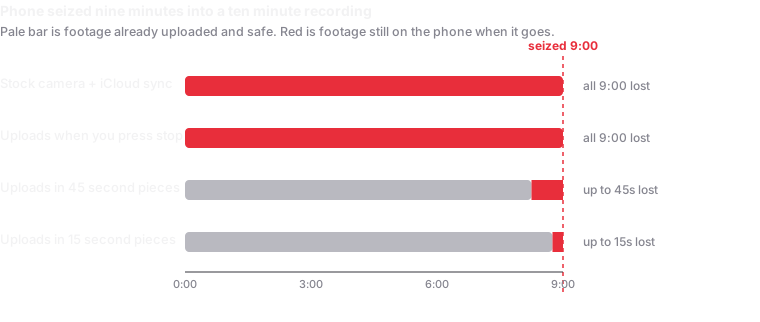
The problem it addresses is narrower than the three above: footage that exists only on a phone stops existing when the phone does. It records with the screen fully dark and uploads in roughly fifteen-second pieces while the recording is still running, to a cloud account you own, so a seized or smashed phone costs you seconds rather than everything. Each piece is SHA-256 hashed on the device before it moves and the session manifest is counter-signed by an independent RFC 3161 time-stamp authority, so a lawyer or a newsroom can verify it with standard OpenSSL without involving me.
There is no server on my end. Footage goes device to your storage and nowhere else, which also means I hold nothing anybody could subpoena from me.
Where it loses: it is iOS only. With no signal, nothing uploads. It cannot help against someone holding both your unlocked phone and your cloud credentials. And ProofMode is a better fit if what you want is verification attached to a camera app you already like. I have compared the alternatives in the police-recording category, including where mine loses.
Security and communications
Signal — free
End-to-end encrypted messaging and calls, and the default for source contact for good reason. Two features specifically worth knowing: disappearing messages, and the blur tool in its image editor, which will detect faces and blur them before you send.
The blur tool is the fastest way to protect someone in a crowd shot, and it works even if you are sending the picture to yourself.
A password manager and a hardware key
Not glamorous and more consequential than any camera app on this page. The realistic way a journalist loses a source is a compromised account, not a compromised phone.
The free setting worth more than all of it: use a passcode of six digits or more instead of Face ID as your lock. US courts have generally treated a compelled passcode as testimony protected by the Fifth Amendment and a compelled face or thumb as more like a physical sample. On an iPhone, holding the side button and a volume button for a second forces it back to passcode entry, and works from inside a pocket.
Editing and delivery
LumaFusion — one-off purchase
Multitrack editing on a phone or tablet that is genuinely production-capable: multiple video and audio tracks, keyframing, colour, and export to Final Cut or Premiere if you need to hand it on. The standard answer for editing a package in the field before a deadline.
Final Cut Pro for iPad — subscription
Worth it if you are already in the Final Cut ecosystem and shooting multicam with Final Cut Camera. Otherwise LumaFusion does more of what most people need for less.
DaVinci Resolve for iPad — free with a paid tier
Colour grading that matches the desktop tool, free, and the natural partner to Blackmagic Camera footage. The edit page is more limited than Resolve on desktop; the colour page is not.
Do not deliver through a messaging app. Every messenger and social platform re-compresses video. The picture survives; the file does not, and with it goes any hash, any embedded verification and most of the metadata. Send originals by link, or hand over the file itself.
If you are building a kit from nothing
The honest minimum, all free: Blackmagic Camera for the image, Voice Memos on a second phone for backup audio, Signal for contact and for blurring faces, and something in the verification section chosen for your actual threat. Then spend money on a microphone rather than on software.
What is not on this list, and why
- Teleprompter apps. Fine, plentiful, and none of them are meaningfully different from one another.
- AI transcription tools. Useful, but they generally upload your audio to a third party, which is a decision to make deliberately about a confidential interview rather than by installing something.
- Anything advertising "undetectable" recording. On a current iPhone the green camera indicator cannot be disabled by any app, including mine. An app claiming otherwise is telling you something about itself.
Related
- How to film the police, step by step.
- How to film ICE, by where it is happening.
- How to record on iPhone with the screen off.
- Verifying footage, for lawyers and newsrooms receiving it.
Written September 2026. App pricing and ownership on this platform change constantly, so check current terms before you commit to a subscription. I have no commercial relationship with any app listed other than my own.