 Witness
The Mobile Justice app is gone
What it did, what went with it, and how to pick a replacement.
ACLU Mobile Justice was discontinued in February 2025. For roughly a decade it was the default answer to "how do I record the police," running in seventeen states and the District of Columbia through individual ACLU affiliates. If you went looking for it recently and found nothing, that is why.
This page is not affiliated with the ACLU. It is written by the developer of one of the apps people now use instead, which is a conflict of interest worth knowing about while you read. The comparison below is meant to be usable even if you conclude that a different app suits you better.
What Mobile Justice actually did
Three functions, and it is worth being precise about them, because most replacements cover only the first:
- Record. You tapped record, and when you tapped stop the footage uploaded to the ACLU affiliate for your state.
- Report. A form for the details a video does not capture: location, officer names, badge numbers, what happened.
- Witness. An alert to other users nearby that a stop was in progress, with directions to it, so someone else could come and film.
The upload destination is the part that mattered most. Footage went somewhere outside your control and outside the reach of anyone who took your phone, and it went to an organisation with lawyers who might act on it.
What you lose without it
Two distinct things went away, and conflating them is how people end up with a replacement that does not actually help.
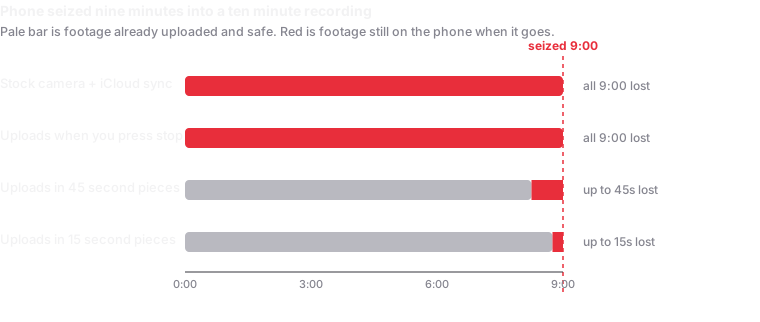
The technical protection: footage leaving the device so seizure or destruction of the phone does not destroy the recording. Several apps still do this, in different ways and with different weak points.
The institutional backstop: a civil liberties organisation receiving your footage, holding it, and potentially litigating. Nothing replaces this. No consumer app gives you a lawyer on the other end. If that was the part you valued, the honest answer is that you now need a relationship with a legal organisation directly, not an app.
What to look for in a replacement
Questions worth asking of anything you are considering, including this one:
- When does footage leave the phone? If it uploads only when you press stop, then a phone taken mid-encounter takes the whole recording with it. That window is the entire problem.
- Where does it go? An account you control, a company's servers, or an organisation's. Each has different failure modes and different people who can be subpoenaed.
- What happens with no signal? Basements, jails and dense crowds all kill connectivity. Does it queue and retry, or silently lose the footage?
- Can you start it without unlocking? Fumbling through an unlock and an app launch is time you may not have.
- Can anyone prove the video is unedited? Increasingly the challenge to footage is not "that did not happen" but "that video was doctored." Hashing and trusted timestamps answer that; a raw video file does not.
- Who else can reach it? If someone with your unlocked phone can open the storage app and delete everything, uploading has bought you less than it appears.
How Witness compares
Written by the person who made it, so weigh it accordingly.
| Mobile Justice | Witness | |
|---|---|---|
| Upload timing | On stop | Continuously, in roughly 15-second pieces, while still filming |
| Destination | Your state's ACLU affiliate | A cloud account you already own (Google Drive, Dropbox, Nextcloud, WebDAV) |
| Someone reviews it | Yes, ACLU staff | No. Nobody sees it unless you share it |
| Legal support attached | Possible, via the affiliate | None |
| Screen while recording | Visible | Fully black, phone reads as idle |
| Tamper evidence | None documented | SHA-256 per piece, plus an RFC 3161 trusted timestamp |
| Nearby-user alerts | Yes | No |
| Cost | Free | Free; paid tier adds capture quality only |
The row that matters most is "someone reviews it." Mobile Justice put your footage in front of an organisation that might act on it. Witness deliberately does not: there is no server, and the developer cannot read, produce or hand over your recordings. That is better for privacy and worse for backup. If you were relying on the ACLU to be watching, you now need to send footage to someone yourself, which is what emergency contacts are for.
Other options
Witness is not the only thing people moved to, and the right answer depends on what you were using Mobile Justice for.
- Your phone's built-in cloud sync. Recording with the stock camera app while iCloud Photos or Google Photos syncs is the lowest-effort option and genuinely better than nothing. The gap is that sync is not designed for this: it is often deferred on cellular, on low battery, or until the phone is charging and on Wi-Fi, which describes none of these situations.
- A Siri Shortcut. "Hey Siri, I'm getting pulled over" can dim the screen, start recording and message a contact. Free, hands-free, and worth setting up regardless. It still uploads only after the recording ends.
- Other dedicated apps. Several exist with cloud upload and emergency contacts. Ask each one the questions above, particularly about when footage leaves the phone.
The part no app solves
Recording is protected in most US jurisdictions when you are lawfully present and not physically interfering, but the rules on distance, audio consent and covert recording vary genuinely and meaningfully by state. The ACLU's guidance for photographers and its protesters' rights pages remain the standard starting point, and the ACLU continues to publish them regardless of the app's fate.
Interference is the charge that most often follows, and it is the one thing a recording cannot protect you from.
Nothing on this page is legal advice.
If Witness is what you want
It is free on iOS, and the field guide covers setting it up before you need it, which is the step that decides whether any of this works.