 Witness
How to record police safely
Where to stand, what to film, what to say, and the setting to change tonight.
Most of what follows has nothing to do with my app, and the single most useful item on this page is a phone setting that takes thirty seconds and costs nothing. I have put it first for that reason.
Change your lock setting. Do it now, not later.
Use a passcode, at least six digits, rather than Face ID or Touch ID as the thing standing between someone and your phone.
The reasoning is that US courts have generally treated these two differently. Compelling you to say a passcode runs into the Fifth Amendment, because it is testimony that comes out of your head. Compelling you to hold your face up to a phone, or press your thumb to it, has often been treated as more like taking a fingerprint, which is not testimony. The law is not perfectly settled and it varies, but the asymmetry is real and it cuts against biometrics in exactly the situation where it matters.
On an iPhone you can also press and hold the side button and a volume button for a second to force it back to passcode entry. Learn that gesture. It works with the phone in your pocket.
This applies whatever app you use, or none. If you take one thing from this page, take this one.
Distance, and where to put yourself
Stand further back than feels necessary. Common guidance is six to ten feet at minimum, roughly a car length, and more when you can.
Distance does three things at once. It keeps you outside any plausible claim of interference, which is the charge that actually gets used. It keeps you out of the immediate physical situation. And it usually produces better footage anyway, because a wide shot showing who was where is more useful than a shaky close-up of nothing identifiable.
You do not have to be in the middle of it. A window, a balcony, a fire escape, a rooftop or the far side of a street all work, and some of the most useful footage of the last decade was filmed from exactly those places.
Hold the phone where everyone can see it
Hold it up, openly, in front of you. Not half-concealed at your hip, not palmed, not peeking out of a jacket.
The reason is blunt: a partially hidden object in someone's hand, in a tense situation, can be mistaken for a weapon. That risk outranks every other consideration on this page.
People conceal the phone because holding a camera up at police feels like it invites a reaction. That instinct is understandable and it is the wrong trade: the thing you are avoiding is attention, and the thing you are risking is being seen holding an unidentifiable object.
This is the one place a black screen genuinely helps. Witness keeps the display fully dark while recording, so holding the phone up in plain sight does not also announce that you are filming. It reads as a phone in someone's hand rather than a camera pointed at an officer. You get the safety of visible without the escalation of obvious, which is exactly the corner people otherwise get stuck in.
What it does not license is palming the phone or filming from inside a jacket. Visible is still the point. The black screen just means visible costs you nothing.
What a dark screen can and cannot do, including the camera indicator no app is allowed to hide, is written up separately.
If they tell you to move
Move. Immediately, and visibly.
Whether the order was lawful is a question for afterwards, with a lawyer, in a building. It is not a question to litigate on a street at night, and refusing is how filming turns into an obstruction charge.
A tactic legal observers use: keep filming while you back up, tilt down to catch your own feet moving, and say out loud "I'm complying, I'm backing up." Now the compliance is on the recording. If anyone later claims you refused to move, the footage answers it.
What to actually film
People film the wrong things under stress. It is worth knowing the order in advance.
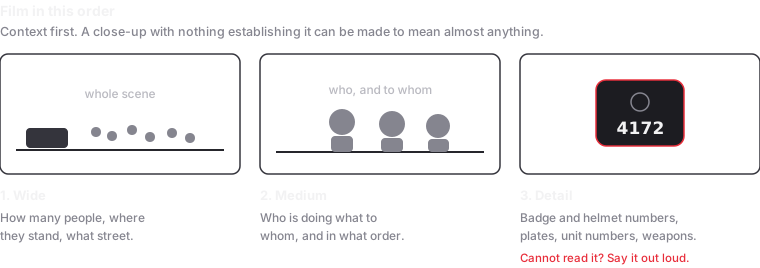
Wide first. Establish the scene. How many officers, how many civilians, what the street looks like, where everyone is standing. Without this, a close-up of a struggle can be made to mean almost anything.
Then the identifying detail. Badge numbers, helmet numbers, name tags. Vehicle plates and unit numbers on the side of cars. Any weapon in use, and which officer is holding it. If you cannot get close enough to read a number, say it out loud when you can read it, or describe the officer clearly.
Then the things nobody thinks to film. Orders being given between officers. Barricades going up or moving. Officers filming the crowd. Medical situations and whether anyone responded. These establish sequence and command, which is often what an eventual case turns on.
Keep it running. One continuous recording is far more useful than fifteen short clips. Continuity is itself evidence, and gaps invite the argument that something was cut.
What to say, and what not to
Narrate, because a camera captures less than you think. Say the date, the time, the street, the intersection. Describe what you are seeing as you see it.
Then the part people get wrong: stick to observable fact. "Officer moved toward the man in the grey jacket" is useful. "This guy is assaulting him for no reason" is an opinion, and opinions can be used to argue you arrived with a conclusion and filmed selectively toward it.
This is not about being neutral in your own head. It is about the footage staying usable. Describe, do not characterise, and let the recording carry the argument.
Saying that you are recording, out loud, when it is safe to, tends to change behaviour on both sides. Many people who do this professionally recommend it for that reason rather than a legal one.
Make sure it survives
Everything above is wasted if the footage dies with the phone, and this is the part I built something for, so weigh it accordingly.
The standard advice is to have your phone backing up to the cloud. That advice is right, and the usual mechanism is weaker than people assume. Photo library sync generally treats your recording as one file that is not eligible to upload until you stop recording, and it commonly defers on cellular or low battery. So the last few minutes before a phone is taken, which is the footage that matters most, are still on the phone.
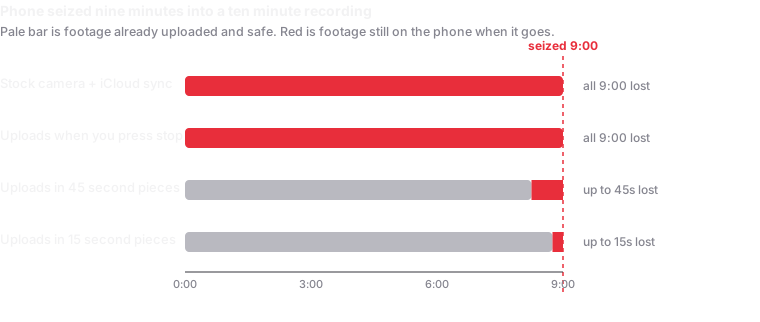
Whatever you use, set it up before the day. An app that has never been connected to a storage account saves nothing, and you will not be configuring cloud accounts in the moment.
Afterwards
- Do not re-encode the originals. Sending footage through a messaging app or posting it to social media re-compresses it, which changes the file. Keep untouched originals and share copies.
- Write down what you remember, the same day. Times, names, what was said, what happened just outside the frame. Memory degrades fast and contemporaneous notes carry weight.
- Get it to someone else. A colleague, an organiser, a lawyer. Footage in one place is footage waiting to be lost.
- Think before posting. Faces in a crowd can identify people who did not choose to be identified, including people with immigration status or protection concerns. WITNESS publishes good ethical guidance on this and it is worth reading before you upload.
Things this page cannot do for you
It is not legal advice and I am not a lawyer. For the legal questions specifically, I wrote up what the courts have actually held, with sources, and it is still not advice.
It is US-centric. Recording law elsewhere differs substantially and I have not researched it properly.
It cannot make a situation safe. Filming does not protect you physically, and there are situations where the right decision is to put the phone away and leave.
Where this came from
The filming technique here follows guidance published by WITNESS, who have been training people to document human rights abuse on video since long before phones could do it. The rights material comes from the EFF, the ACLU and the National Lawyers Guild. Go to them directly; they are better on this than I am.
No connection to WITNESS the organisation, whose name my app unfortunately shares.